This article provides a clear overview of the terminology and hierarchy used within Orion and Eclipse. Understanding this structure is essential for navigating client relationships, accounts, and assets within the system.
Note: The example shown in the accompanying visual is hypothetical and is intended for illustrative purposes only.
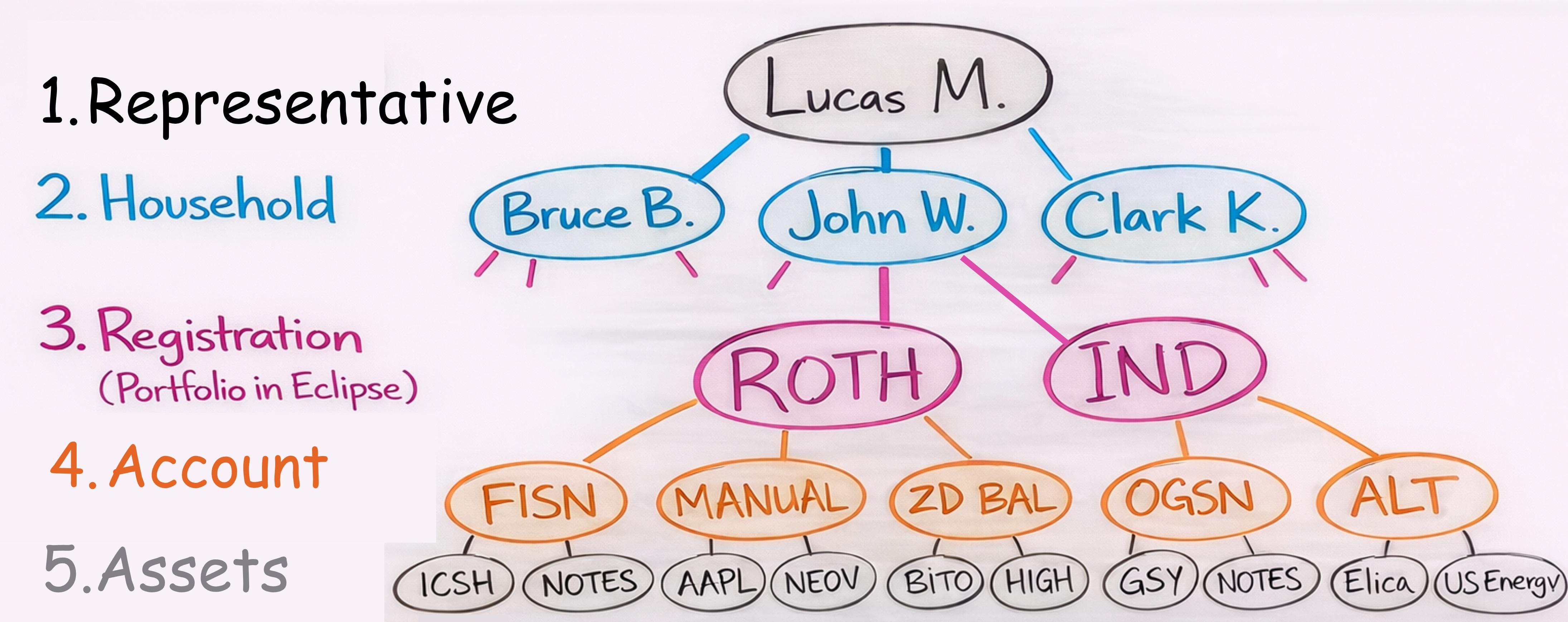
System Hierarchy
Orion and Eclipse are organized into five primary levels:
1. Representative (Advisor)
The Representative is the top level of the hierarchy. Each advisor at Legacy Wealth Management is assigned a unique Rep ID. This level provides access to all data and entities associated with that advisor, including households, accounts, and assets.
2. Household
Households are directly tied to a Representative. A household represents the full client relationship and may include:
- An individual client
- A client and spouse
- A family unit
This level groups all related accounts under a single client relationship.
3. Registration (Portfolio in Eclipse)
Registrations represent the custodial accounts held at Schwab and are tied to a household. Examples include:
- Roth IRA
- Individual account
- Joint account
Orion Connect refers to these as Registrations, while Eclipse uses the term Portfolios. These terms are interchangeable.
This level serves as the container for underlying Accounts.
4. Account (Sleeve)
Accounts, also referred to as sleeves, exist within each Registration. It is important to understand that a sleeve is an account in Orion.
Each Account is tied to a specific investment model. For example:
- An Account for FISN
- An Account for Tactical Income
- An Account for any model assigned to the Registration
These Accounts hold the actual invested assets at Schwab.
System-Generated Sleeves
There are three system-generated sleeves that serve specific operational purposes:
- Contribution Sleeve
Used for incoming cash - Distribution Sleeve
Used for outgoing cash - Custodial Sleeve
Also referred to as the “homeless” sleeve. If Orion cannot determine the appropriate Account for a security, it will be placed here
Assets in the Custodial Sleeve can disrupt rebalancing. If assets appear here, they should be manually moved to the appropriate Account.
5. Assets (Securities)
Assets are the underlying securities held at Schwab, including:
- Mutual funds
- ETFs
- Bonds
- Alternative investments
Each asset is tied directly to a specific Account.
Assets can be moved between Accounts using the Sleeve Transfer tool in Orion. While most transfers are handled by the Ancorato team, Tier 2 Representatives have the ability to perform these transfers when needed.
Key Takeaways
- The system follows a top-down structure: Representative → Household → Registration → Account → Asset
- “Account” and “Sleeve” are interchangeable terms in Orion
- Registrations (Orion) and Portfolios (Eclipse) refer to the same concept
- Assets must be properly assigned to Accounts to ensure accurate rebalancing
Was this article helpful?
That’s Great!
Thank you for your feedback
Sorry! We couldn't be helpful
Thank you for your feedback
Feedback sent
We appreciate your effort and will try to fix the article